
Most outages do not have just one cause. Often, a few small things come together: a config change, an old bug, or a missing alert. Each one looks safe on its own. They can work for a long time without a problem. But together, in the right conditions, they can cause an outage.
A few things came together in our case too. We deployed two changes on the same day. One made the app safer. The other made it faster. A few hours later, customers could not log in. The database had no free connections, even though it was not running any queries.
TL;DR
When PHP-FPM has the grpc extension, opcache.preload is on, and the master runs as non-root, some workers get stuck on their first gRPC call. Forever. The gRPC call timeout does not help. Even an empty preload file is enough.
The stuck workers do not finish their requests or close their database connections. The number of open connections grows until it reaches the limit, even though the database is not running any queries.
The workaround:
grpc.enable_fork_support=1
grpc.poll_strategy=epoll1
Known bug: grpc/grpc#30526, open since 2022.
Outages like evenings
A quiet September evening. The animals are ready for the night. I have just finished looking after the animals on the farm. They are all fed and safe behind closed doors, away from animals that could attack them. I can sit down and do nothing for a while.
Then Slack makes a sound. One notification, then another, then more. I look at the screen. SRE says customers cannot log in to the panel. They only see “Something went wrong”. My rest has to wait.
I open Grafana and quickly check the dashboards. Traffic, errors, response times — I look for something that can explain why login stopped working. SRE also suggests rolling back the last release. We do not know yet if this will help.
At last, I find the MySQL connections graph. 708 connections, with max_connections set to 700. New connections fail. The login panel needs our API, and the API needs the database. I have my first real clue — but not the cause yet.
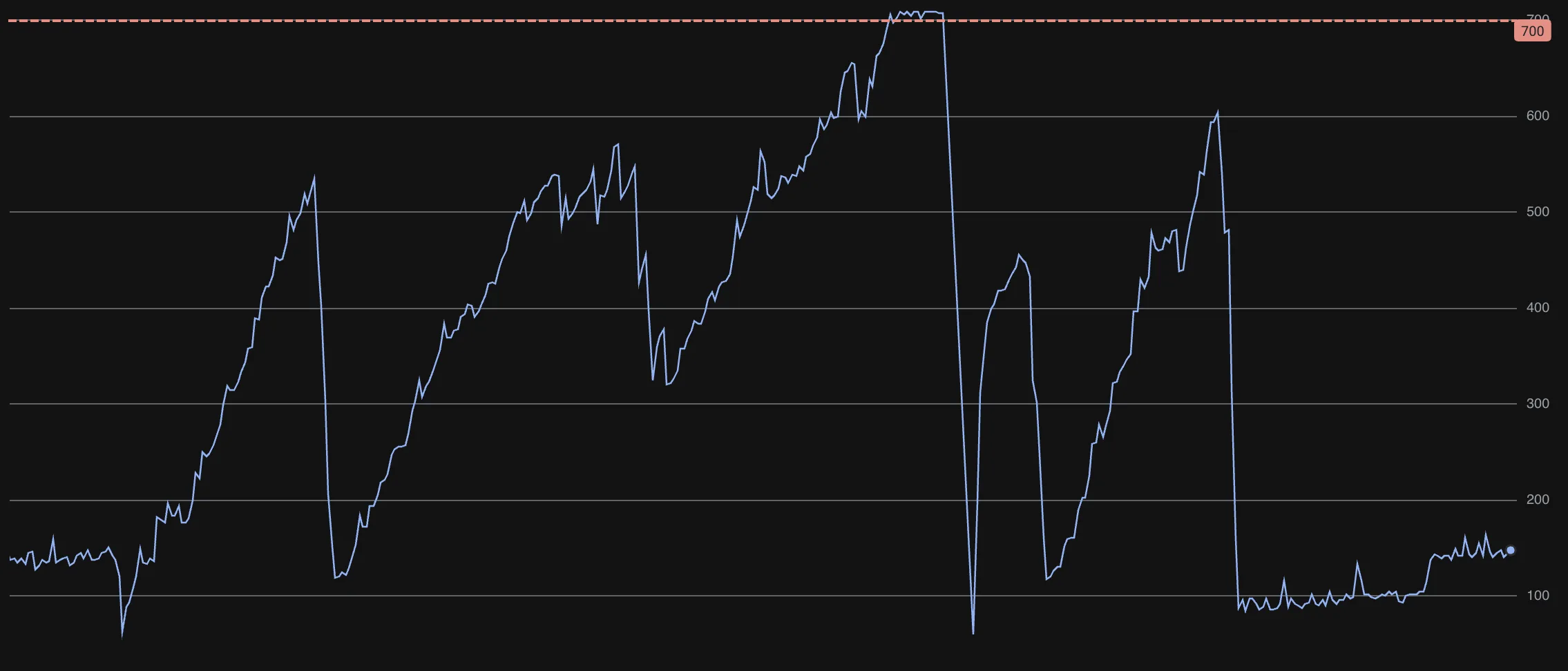
My first thought: the database is slow. But the data tells a different story:
- traffic is flat, as usual;
- queries are faster than average;
- all connections are in
Sleep, zero are active; - some connections have been idle for over an hour.
My next thought: consumers. They can keep database connections open for a long time. Maybe they are stuck or keep restarting? Maybe a Kubernetes rollout is stuck, and we have more pods than usual?
I check K9s. The number of pods is normal. Nothing is restarting. No rollout is stuck. This is not the answer.
After a few tries, I manage to connect to MySQL. With no free connections, even checking the problem needs a little luck. I look at the connection list and check where they come from. Not the consumers. They come from the pods that handle HTTP requests.
Strange. Why so many connections from the web pods? Traffic is normal. The database has no extra load and no extra queries.
We do not use persistent PDO connections. In the web app, the database connection should close when the request ends. Our nginx and PHP-FPM timeouts are only a few dozen seconds. Connections sitting idle for many minutes, or even an hour? This should not happen.
But the connections are still there. It looks like the requests never finish, and the workers do not close their connections. What are they waiting for if the database is doing nothing?
Hot-fix
There is no time to guess now — we need to get the app working again. Before I could sit down at my computer, SRE had already noticed that the number of connections seemed to grow after the last deploy.
I check what was in it: opcache config changes, only to make things faster, with no business logic changes. I check the graph for the last few hours. Yes — the number of connections starts growing after this deploy. It looks like a good clue. We roll back the last release.
For a moment, it looks like it helped. The number of connections goes back to normal. Login works again. But every deploy replaces the pods. The old processes stop, and their MySQL connections close too. A restart alone can remove the problem for a short time.
Soon, the number of connections starts growing again. This rollback did not fix the problem, but it gave us some time. We also have a way to get the app working for a while: kubectl rollout restart. It does not fix the cause, but it closes the open connections.
I make the graph show a few more hours before the deploy. Now it is clear: the connections were already growing before the last release. By bad luck, the first graph started right at that deploy. I saw only part of the story and thought it was the start of the problem.
I check older deploys, one by one. What else changed? Most are small fixes. At first, nothing looks like it could cause this outage.
At last, I find another small change: turning on preload in Symfony. Now something feels familiar. Preload, stuck processes… I have read about this before. But where? I cannot remember yet, but I keep thinking about it.
Then I remember. I had a similar problem in my own project, workerman-bundle. Child processes got stuck with no errors in the logs. The cause was the gRPC extension and how it worked with fork().
I open the note in the project docs. It warns about gRPC threads and deadlocks in child processes. There is also a workaround: GRPC_ENABLE_FORK_SUPPORT=1.
That was Workerman. This is PHP-FPM. It does not prove the cause is the same. But both cases have child processes, the gRPC extension, and a process that stops responding. Now I have something real to check.
I open the issue linked in the docs. One more jump between issues, and I find grpc/grpc#30526 — “PHP gRPC extension causes fpm child to hang up on shutdown”. I read it and see familiar things: PHP-FPM, preload, and stuck processes. Almost our exact case.
With one difference. As far as I remember, our container runs as root. The problem in the issue happens when the PHP-FPM master runs as a normal user. So it should not happen to us. Unless I missed something.
Two good deploys in one day
I go back to that day’s changes. This time, I also check the PHP base image. And I find something I missed: USER app at the end of the Dockerfile. The container no longer runs as root. Neither does the PHP-FPM master.
This change went live in the morning. It had a good reason: we do not want the app to have root permissions if it does not need them. It passed review and caused no problems on its own.
In the afternoon, we added the second change — preload. This also made sense. Opcache was always full. Our app has over 33,000 PHP files, and the default limit is 10,000. While fixing the config, we also turned on opcache.preload to prepare the Symfony code before handling requests. What could go wrong?
Two changes, two good goals: safety and speed. Only now do I see that together they match the case in the issue: the gRPC extension, preload on, and a PHP-FPM master running as non-root.
I look at the graph again. Connections start growing after we turn on preload. Both changes are now in production. Together, they are a dangerous mix. During the day, new deploys replace the pods and close the connections before they reach the limit. Each time, we put out part of the fire without knowing it. But it is still burning quietly. All it needs is for us to finish work and stop deploying.
We found the cause
Now I have a suspect, so it is time for another rollback. I check the changes made after preload again. Luckily, they are small fixes, with no database migrations or big business logic changes. We can go back to an older image.
We decide to roll back through the Kubernetes manifest instead of reverting the code. We point it to the old image version. It is faster, with no wait for a build and no risk of conflicts when reverting changes.
We see things get better after just a few seconds. But we have seen the connection count drop before, so we do not celebrate yet. I sit with the team and watch the MySQL graph like a fire that is almost out. We wait to see if the fire comes back.
This time, the number of connections does not grow. The graph stays flat. We can leave it for the night.
One last Slack message for people who start work early: no deploys until we say it is safe. The code in the repository still has the bad config. The next deploy would bring it back to production.
Time to rest. Tomorrow, we will fix the config properly.
After the storm
In the morning, we need to clean up after last night’s fire. First, we need to make deploys possible again. This time, we really revert the bad change in the code.
There are no conflicts. So we could have reverted the code last night instead of changing the image. But I do not regret the choice. If there had been conflicts, I would have spent more minutes checking my fixes while customers still could not log in. Now we can do it calmly and have time for tests.
The revert is ready. We can deploy again. The other fixes we removed with the image last night go back to production.
But we still want preload. So I check the config from the GitHub issue:
grpc.enable_fork_support = 1
grpc.poll_strategy = epoll1
Everything works locally. We also test under load — still no problems. We deploy preload again, this time with the gRPC settings.
We watch the connection graph, a little worried. This time, it stays at a normal level. Requests finish. Database connections close. Everything works as it should.
We are almost done. There is still the postmortem to write. Luckly, this time it is not my job.
Monitoring — we got this wrong
When things are calm again, I go back to the graph. I see how much time we had to react. A few hours passed between turning on preload and the outage. Connections were growing, but we only heard about the problem from SRE.
This is another part of the story. We did not monitor connections in a way that would warn us before we hit the limit. We had a graph, but no alert. We collected the data, but nothing would wake us up when things became dangerous.
The worst part is that this had happened before. A rollout problem once caused a big jump in the number of pods — and database connections. That is why I checked K9s early in this outage. We already knew this kind of problem. But we still had no alert for a limit that had hurt us before.
The gRPC bug started the problem. But our missing monitoring let it grow until customers could not log in.
Configuration — our mistake
There is no point hiding this either: our PHP-FPM settings did not match the MySQL connection limit.
Each pod has pm.max_children = 80. The autoscaler allows 5 to 15 pods. With just 9 pods, we have 720 workers. Each one may need a database connection. MySQL accepts 700 connections. With 15 pods, the web app alone can need 1,200 connections. And we also have cron jobs and consumers.
Normally, requests finish quickly and close their connections. So this setup worked for a long time. But we let the app ask for more connections than the database could accept — for example, during a sudden jump in requests or a DDoS attack. The stuck workers just made our mistake visible.
Minimal repro for curious readers
If you like technical porn, this part is for you. Everyone else can skip to the lessons below.
After the outage, I wanted to see how little I needed to make the workers get stuck. I started with the full stack: nginx, MySQL, Symfony, and a gRPC server. Then I removed one part at a time. The bug stayed, but the setup got smaller. In the end, I had three files on Alpine: Dockerfile, index.php, and repro.sh.
The most interesting part? I did not need a database, Symfony, or even a gRPC server. I sent the call to a port with nothing listening on it. The preload file only had <?php. And the workers still got stuck.
The Dockerfile sets up PHP-FPM and an empty preload file:
FROM alpine:3.22
RUN apk add --no-cache php84-fpm php84-opcache php84-pecl-grpc fcgi
RUN printf '[global]\nerror_log=/dev/stderr\n[www]\npm=static\npm.max_children=25\n' > /etc/php84/php-fpm.d/zz.conf
COPY index.php /app/
RUN echo '<?php' > /app/preload.php
USER nobody
In index.php, one gRPC call is enough:
<?php
$call = new Grpc\Call(new Grpc\Channel("localhost:50051", []), "/x/y", Grpc\Timeval::infFuture());
$call->startBatch([Grpc\OP_SEND_INITIAL_METADATA => []]);
echo "ok\n";
repro.sh runs PHP-FPM as non-root, with the gRPC extension. It sends 25 requests at the same time — first without preload, then with it:
#!/bin/sh
cd "$(dirname "$0")" && docker build -q -t grpc-preload-repro . >/dev/null
for preload in "" "-d opcache.preload=/app/preload.php"; do
    printf 'php-fpm84 %s: ' "${preload:-(without preload)}"
    docker run --rm grpc-preload-repro sh -c "
        php-fpm84 -D $preload 2>/dev/null; sleep 1
        for i in \$(seq 25); do
            SCRIPT_FILENAME=/app/index.php REQUEST_METHOD=GET timeout 10 cgi-fcgi -bind -connect 127.0.0.1:9000 &
        done; wait" 2>/dev/null | grep -c ok | sed 's#$#/25 responded#'
done
An example result:
without preload: 25/25 responded
with preload:    10/25 responded
With preload, the number of replies changed between runs. Without it, I always got all of them. The gRPC call timeout did not help either. I tested both one second and 20 seconds.
The repro needed all the parts together: gRPC, preload, an FPM master running as non-root, and requests making gRPC calls at the same time. Creating a channel alone was not enough. I also used a static pool of 25 workers. The workers started at boot got stuck. With only a few workers at startup, it was easy to miss the problem.
What I learned
Two good changes can break production when used together. Frequent deploys can hide it. And a timeout does not mean a request will always finish.
We missed two things: an alert for the connection count, and app limits that matched the database capacity. The gRPC bug started the fire, but we cannot blame the library for our mistakes.
Next time, I would rather get an alert than a message from SRE. That gives me more time to react before the problem reaches customers.